XLeap Discussion

XLeap Discussion makes it possible for your group to explore the most relevant or controversial topics in writing—so arguments, questions, and supporting information become explicit and actionable.

  • Cover several high-priority topics in parallel—so important issues do not fall through the cracks
  • Engage participants in clear, structured exchanges
  • Anonymity improves candor and reduces bias

How Discussion works

Discussion lets groups explore complex topics in writing—fast, parallel, and structured to reach clear conclusions.

Host's view of an open Discussion topic

  • Parallel topics: Discuss several questions at the same time, so participants focus on topics that concern them most or where they can contribute something essential.
  • Parallel contribution: Everyone can write at once and build on each other’s input without waiting for turns. Nobody dominates.
  • Structured exchange: Clear threads and direct replies move the discussion forward and keep it to the point. Optional prompts ensure the discussion covers the aspects that matter.

Drill into multiple topics in parallel

With XLeap Discussion, groups can work on several topics at the same time. This makes better use of the expertise in the (virtual) room than addressing topics one after another: not every topic is equally relevant to everyone, and participants can focus on topics that concern them most or where they can contribute something essential while still following the overall conversation.

Traditional breakout sessions are often a poor substitute because they:

  • lock people into a single topic even if they could contribute to several,
  • fragment context when participants switch between breakouts, and
  • separate topics that may be closely connected.

Participant view of multiple Discussion topics

Making the most of participants’ time

When time is limited, discussing topics one after another often means that important issues remain undiscussed for lack of time. Parallel topics reduce this risk and make it easier to involve key stakeholders without extending the workshop.

What parallel discussion means

In a traditional discussion, 20 minutes often produces only a handful of spoken contributions. In an XLeap discussion, everyone can contribute simultaneously.

Example: with 12 participants, 20 minutes of parallel discussion equals 240 participant-minutes of active contribution time (12 × 20). That is why the group can cover more ground, test arguments faster, and reach clear conclusions within the workshop.

Topics

Hosts add topics manually or by copy & paste. Often, topics are highly prioritized or controversial ideas and suggestions, issues the group needs to understand better, or points where consensus is required.

Participants navigate between topics independently. They focus on topics that concern them or where they have something specific to contribute, and they can skim the rest.

Male facilitator

Smart navigation

Contribution counters help participants navigate to where their attention is needed—either because certain topics have many new (unread) contributions, or because topics have not yet been addressed or explored in enough depth.

The counters show the total number of contributions per topic and how many of these a participant has not yet read. When time is almost up, it is good practice to reserve a few minutes so everyone can review unread contributions and share the same information base before moving on to next steps.

Exchange views and arguments, to the point

Participants “enter” a topic to contribute. Contributions are immediately visible to all and can be responded to directly with an argument, supporting information, or a question. Replies are threaded to the contribution they refer to, so context is maintained.

This enables several rounds of exchange on the same point—making it easier to clarify assumptions, test reasoning, and converge on conclusions.

The power of anonymity in discussions

In discussions, anonymity often makes the difference between superficial agreement and real progress.

  • Candor: Participants are more likely to say what they really think and know—early, clearly, and without self-censorship or spin.
  • Merit: Contributions stand on their substance, not on the contributor’s position, reputation, or group affiliation.
  • Learning: Anonymity makes it easier to revise opinions when better arguments or new information emerge—because changing your mind does not come with personal exposure.

Anonymity creates the conditions for focused, evidence-based discussion—and for conclusions the group can genuinely stand behind.

EXPLORE THE POWER OF ANONYMITY

Sticky dots

In discussions, many contributions only make full sense in relation to what they respond to—an objection, an additional fact, a clarification question, or a reframing. In oral exchanges, it is difficult to highlight these moments without interrupting the flow or losing track.

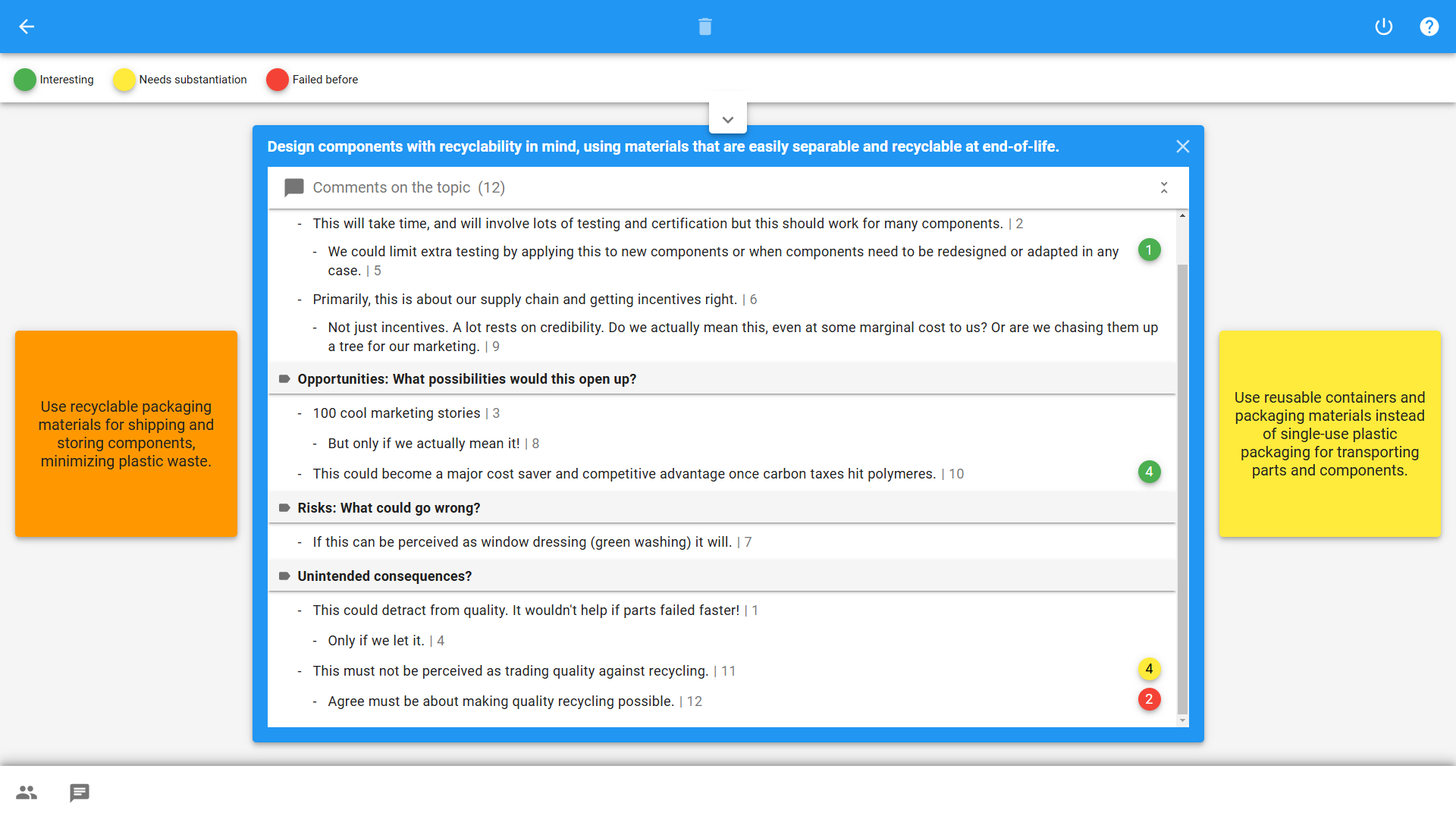
In XLeap Discussion, sticky dots let participants flag and highlight comments in context, exactly where they sit in the thread. This makes it easy to take a quick pulse of the discussion and focus attention—for example on points that need evidence, questions that require an answer, or arguments that should be carried into conclusions.

The host defines up to five dot types (meaning, quantity, and color), chooses whether dots can be placed on topics, comments, or both, and decides whether allocation happens privately first or is visible live. Depending on your purpose, the host can allow multiple dots per topic or comment.

Participant’s view of contributions marked up with sticky dots

Discussion prompts

Hosts can structure discussions with prompts to ensure that each topic covers the relevant aspects—not just the obvious points, the default lines of argument, or the loudest opinions.

Prompts are especially useful when the discussion needs to produce outputs in a specific format, for example to feed into predefined next steps, processes, templates, or systems.

Automatic documentation - Export

Like all XLeap workspaces, Discussion is self-documenting and included in the Word report available immediately.

For follow-up and reuse in other systems, export topics and contributions to Excel or as a text file (.txt).

Start with XLeap

Whether you can choose your own tools or want to establish XLeap across your organization, there is a straightforward way to get started.

For independent professionals

If you can choose your own tools, you can start using XLeap right away—with zero admin overhead.

  • Try XLeap free for 14 days
  • Personal onboarding included
  • Personal XLeap subscription: {cur}4,900 / year
  • 3 hours of training at no additional cost
Start your free trial
Subscribe now

For organizations

Talk to us about how you want to use XLeap, your deployment requirements, and rollout.

  • Use cases and workshop settings
  • Deployment options (Cloud, Managed, In-house/SCIF)
  • Information security & compliance
  • Onboarding and training for your team
Book a demo
Contact us

For education and non-profits

Educational institutions and non-profit organizations receive special terms with XLeap.

Get in touch—we’ll find the right model for your use case.  NON-PROFIT INQUIRY