Automatic documentation

XLeap workspaces are self-documenting, which means that participant contributions and the written instructions of the Host are captured automatically as part of the workshop.

This is fundamentally different from recording and transcribing a conversation. XLeap preserves each contribution verbatim while protecting the contributor’s anonymity.

Session report

At any time, Hosts can create a session report in Word format (.docx) for distribution to participants and anybody else who should receive the outcomes of that session.

Tailored reports

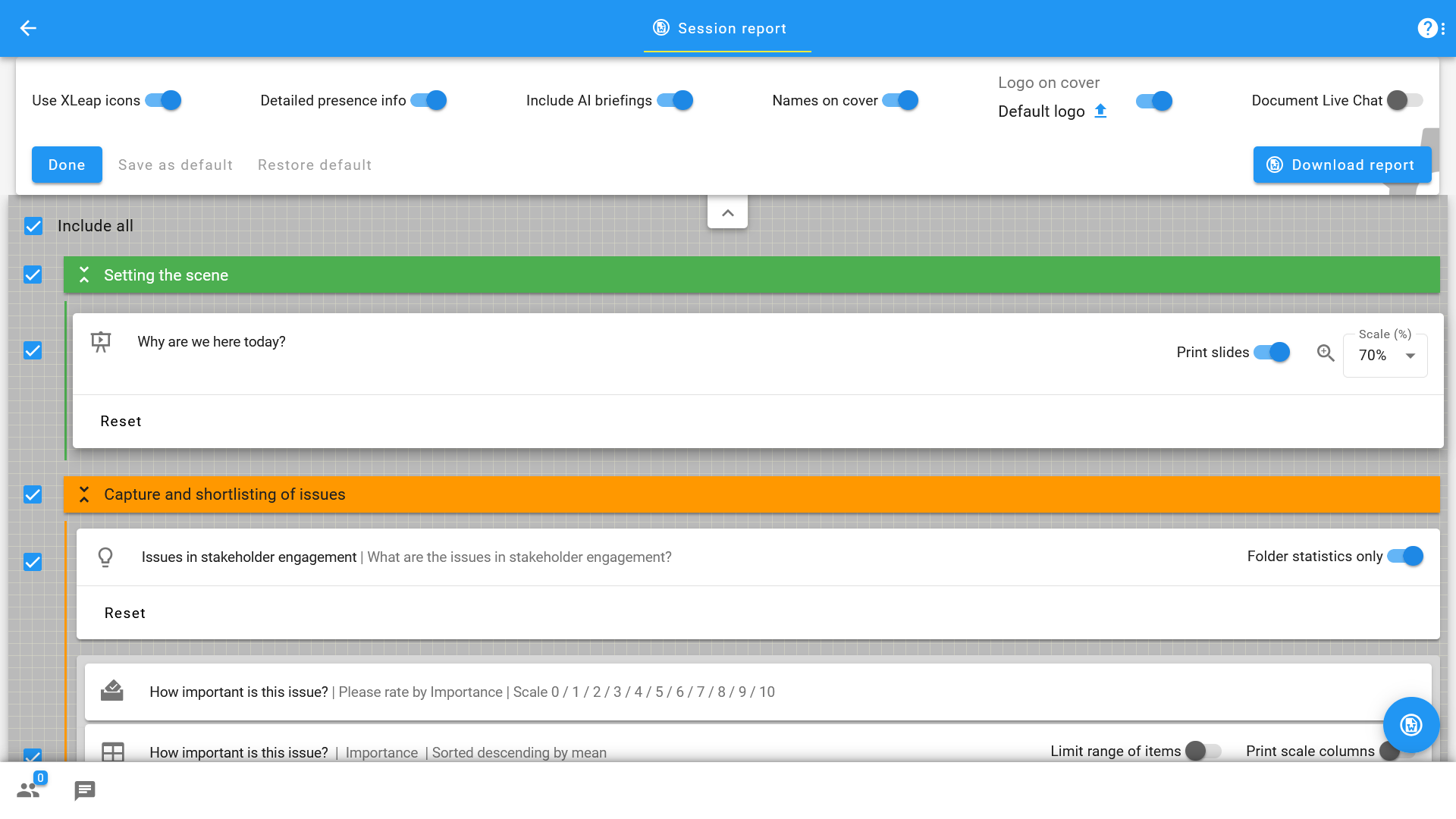
To cater for different information needs, Hosts can adjust the comprehensiveness of the minutes by deselecting unneeded content or aggregating information.

For instance, the detailed listing of brainstormed ideas may be unwanted if those ideas are given again in the results of a subsequent rating. Or management may only be interested in the top scoring ('most important') items. For this, it is possible to limit the range of results tables and charts to the 'top X' or 'bottom Y' items.

Host configuring the content and look or a session report

Conversely, Hosts can include extra results tables for analysis which were not shown in the session, such as 'team' comparisons, and so on.

Slideshow presentations can be documented with the slides or just the content of the feedback channel.

Full flexibility in Word

Pushing a button creates the report Word format (.docx). Depending on browser settings, the report can be opened directly in Word or must be downloaded first. Word offers all possible ways of editing and, of course, conversion to PDF.

Male facilitator

Export to Excel

Where the Word report presents the outcomes of the session in context and with reader-friendly formatting, workspaces also provide for the export of content in machine-friendly format:

  • Brainstorm, Discussion and Presentation provide for download in the universal plain text (.txt) or in Excel (.xlsx) format.

  • Rating results tables can be downloaded as Excel (.xlsx) files which hold all relevant data for that single or multi-criteria  assessment.

Excel compatibility means that the outcomes of XLeap sessions can be processed by almost any system. Frequent use cases include:

  • Further analysis and more sophisticated graphical representation of Rating results prior to presentation with management in Excel or Google Sheets
  • Import of identified and assessed risks to Risk Management Systems
  • Import of ideas and concepts to Idea Management Systems     

Start with XLeap

Whether you can choose your own tools or want to establish XLeap across your organization, there is a straightforward way to get started.

For independent professionals

If you can choose your own tools, you can start using XLeap right away—with zero admin overhead.

  • Try XLeap free for 14 days
  • Personal onboarding included
  • Personal XLeap subscription: {cur}4,900 / year
  • 3 hours of training at no additional cost
Start your free trial
Subscribe now

For organizations

Talk to us about how you want to use XLeap, your deployment requirements, and rollout.

  • Use cases and workshop settings
  • Deployment options (Cloud, Managed, In-house/SCIF)
  • Information security & compliance
  • Onboarding and training for your team
Book a demo
Contact us

For education and non-profits

Educational institutions and non-profit organizations receive special terms with XLeap.

Get in touch—we’ll find the right model for your use case.  NON-PROFIT INQUIRY