XLeap Brainstorm

Use the Brainstorm workspace to:

  • Generate many more original ideas—faster. Capture comprehensive, unfiltered lists of ideas, opinions, facts, or questions.
  • Involve one or more AIs to contribute perspectives and expertise not covered by the group.
  • Help your group structure input quickly: comment on contributions, sort items into theme folders, and mark up folders, items, or comments with sticky dots.

Enable anonymity when needed. Without fear of personal consequences, participants share what they know and truly think.

Host's view of the list of ideas

Brainstorm is self-documenting. A Word report and export to Excel are available immediately.

Spark ideas

Open Brainstorm and let participants build on each other’s input in real time—parallel contributions and instant visibility spark associations, variants (“not this, but that”), and follow-up ideas.

Ask your question and open the Brainstorm workspace for participants—and, if enabled, for participating AI.

  • Participants contribute in parallel and see new inputs instantly, which encourages associations and follow-up ideas.
  • Participating AI contributes via API. The host briefs the AI and controls how often additional ideas are requested while brainstorming is in progress.

Anonymity and parallel contribution create a genuine flow that is difficult to achieve with traditional brainstorming.

All ideas welcome

With Brainstorm, groups become highly productive: participants do not wait their turn, and—when anonymity is enabled—are more willing to contribute spontaneously and build on ideas, regardless of who they come from. The result is broader coverage, fewer gaps, and better starting material for prioritization.

No name, no problem

By default, Brainstorm contributions are anonymous. If needed, the host can choose to show a group label or the contributor’s name.

This helps reduce personal or departmental bias and keeps the focus on the substance of each contribution—including input from participating AI, which should be evaluated on merit rather than on who (or what) wrote it.

Participating AI

XLeap does not include AI by default. Instead, you can connect:

  • ChatGPT or Azure OpenAI
  • Your organization’s or your client’s enterprise AI

You need valid API keys and administrative permission.

The host stays in control: AI participation is structured and transparent, without dominating the group. Once anonymity has done its job, hosts can mark up AI contributions as needed.

Opinions, questions, facts, causes

Brainstorm is not limited to ideas. Use it whenever you need to capture a complete picture quickly—what people think, what they know, what they are unsure about, and what might be driving an issue.

Often, this is about:

  • Opinions: assessments, concerns, risks, and proposals
  • Questions: open issues, assumptions to validate, decision criteria
  • Facts: observations, evidence, constraints, and dependencies
  • Causes: hypotheses, root causes, contributing factors, and patterns

This is often the fastest way to bring out what matters in the situation before you move on to prioritization and decision-making.

Commenting

In Brainstorm, commenting does not break the flow. When the host enables comments, participants can add context, ask clarifying questions, or challenge contributions while others keep contributing.

For creative idea work, the associative flow stays intact because no one has to wait for a discussion round. For opinions, facts, questions, or causes, comments add evidence, precision, and counterarguments—without interrupting collection.

If you want to use comments systematically, provide short comment prompts so feedback covers all relevant aspects, including objections and criticism.

Participant commenting on an idea, responding to a prompt

Theming

When contributions are in, categorize them by creating theme folders and asking the group to sort items by drag & drop. Because everyone helps, structuring a long list becomes fast—and produces smaller, clearer sets of related items.

Theming also supports deduplication: similar items are easier to spot and can be merged to reach a clean, shared level of abstraction.

If you want, theme folders can be kept as categories for rating and results.


Host adds folder during theming

Mark up with sticky dots

Sticky dots are a quick way to mark up contributions—an alternative to Rating when you want fast signals rather than precise assessments where alignment is measured.

The host defines up to five dot types (meaning, quantity, and color), chooses whether dots apply to folders, items, or comments, and decides whether allocation happens privately first or is visible live. Depending on your purpose, multiple dots can be allowed per item.

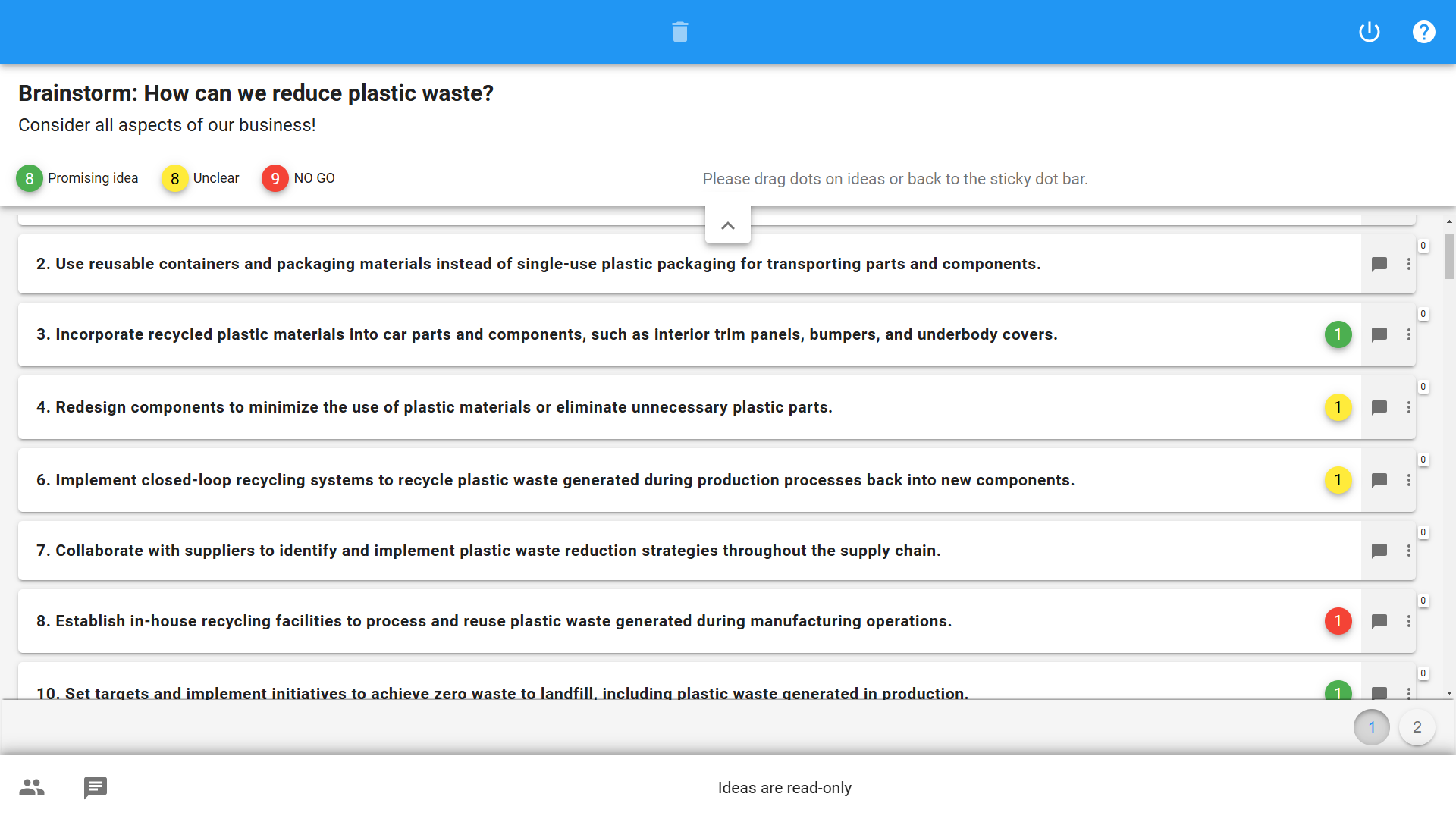
Participant flags ideas as 'Promising', 'Unclear', or 'NO GO'

Follow-up

Brainstorm can produce large volumes of input very quickly. To focus attention, immediate prioritization is often the next step.

Multiple collaborative XLeap processes

Typically, the list is copied into a Rating sheet for assessment against one or several criteria (for example: importance, likelihood, or effectiveness).

Depending on the workshop purpose and time available, top-rated or controversial items are often taken into Discussion for deeper understanding.


Automatic documentation - Export

Like all XLeap workspaces, Brainstorm is self-documenting and included in the Word report available instantly.

For follow-up work and reuse in other systems, export the content to .txt or Excel.

Start with XLeap

Whether you can choose your own tools or want to establish XLeap across your organization, there is a straightforward way to get started.

For independent professionals

If you can choose your own tools, you can start using XLeap right away—with zero admin overhead.

  • Try XLeap free for 14 days
  • Personal onboarding included
  • Personal XLeap subscription: {cur}4,900 / year
  • 3 hours of training at no additional cost
Start your free trial
Subscribe now

For organizations

Talk to us about how you want to use XLeap, your deployment requirements, and rollout.

  • Use cases and workshop settings
  • Deployment options (Cloud, Managed, In-house/SCIF)
  • Information security & compliance
  • Onboarding and training for your team
Book a demo
Contact us

For education and non-profits

Educational institutions and non-profit organizations receive special terms with XLeap.

Get in touch—we’ll find the right model for your use case.  NON-PROFIT INQUIRY